Introduction#
Pokemon GO was released in the summer of 2016, and was an instant hit. It sounds comical now, but people were walking onto freeways in order to try to collect rare Pokemon. The base game was fun enough. Walk around, spin PokeStops for items, and collect Pokemon with the balls you got from PokeStop. At that point, I don’t even think they had the battle mechanic worked out yet. It was a collector’s game.
My interest in the game was how far I could automate it. And, before I inevitably got banned, I made it pretty far. Thankfully, I was able to spend a few months working on this and learned quite a lot before that happened. I finished a text-based version, and also made good work on a visual client. Below, I will detail the two versions, and then go into what it taught me.
First Attempt: PoGo Purple#
Like how Pokemon games are named after colors, I named my two different editions based on colors as well. The first one I did was PoGo Purple. This was a text-based version. This was mostly me trying to get my head around async programming and the Pokemon GO api I was using.
Setup#
I had researched various Pokemon GO scripting client libraries. I had found a Node.js one that looked to be easiest to use and had the most features. I remember there being some concern about which were going to trip up the anti-botting algorithms, but this seemed like it was not running into the same problems others were complaining about. Unfortunately, they seemed to let bots stay active for a little while after flagging them and then performing a mass ban. I was able to stay active through a few rounds.
I was using WebStorm at the time as my IDE. I believe I just had the defaults without any project-specific configuration files. This was before the tooling really became mature for something like that.
Implementation#
With that library loaded globally via npm, I was working on a single-file script to automate the main gameplay loop:
- Navigate to different lat/long coordinates in the game.
- Check for nearby pokemon, navigate to them if necessary, and catch.
- If the pokemon were under a specific toughness score, discard.
- Go to PokeStops for items.
What I Learned#
Obviously there is a lot in the script that I would do differently, but this was a project I cut my teeth on trying to figure out how async/await worked and weighing the benefits of that versus callbacks. Callback hell is real, and it is clear I was trying to follow a callback-style architecture without going overboard. I believe that I had a choice of a few different libraries, and this one used callbacks. If I am remembering correctly, I chose this because it was easier to understand. Functions are clear enough. Knowing that a callback will be called on success or failure and passed different arguments that will represent either the success state or failure is simple enough.
I learned how to make my own logging structure. I believe I also at some point took it to the next level and had it logging to a file. This also led me down a rabbit hole of logging libraries and reading up on how they differentiate themselves.
I learned about callback hell. I was keeping track of state in global variables which were being modified by these callbacks that could, in theory, run asynchronously. Looking back now, it’s surprising it worked as well as it did. I think my saving grace was that I had sectioned my code so that these callbacks were never reading/writing to the same variables in a way that would interfere with each other.
I learned about how Pokemon GO handles nearness to objects using S2 cells and how it is factored into whether or not the player is within range of objects on the map. This was a difficult one. I believe I had tried to write something by hand that would be able to account for this, and then landed on teleporting directly on top of objects. Obviously this is not a smart thing to do as users would generally get just close enough before attempting to interact with an object.
Output#
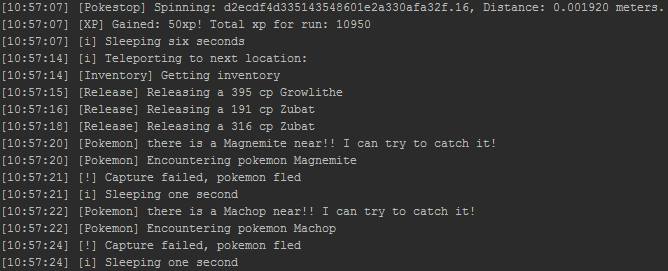
This shows off a few things:
- My logging structure I was very proud of. Made these much easier to read than some of the examples I saw of other people’s scripts.
- Us visiting a PokeStop to get items/xp.
- Us moving to a new location using a sleep that was configured to be shorter or longer depending on how far away we were teleporting.
- Attempting to capture Pokemon.
- Releasing Pokemon that were lower than the IV (toughness) score that was set.

This sample is more of the same, just more of it. We were successful in capturing some Pokemon, and we teleported to a few different locations.
Second Attempt: PoGo Red#
This second attempt was a rewrite of the first that focused on adding a web-based UI frontend. Instead of monitoring server logs, the user could navigate to a page and see on a PokeMon GO-themed Google map with multiple bot accounts displayed, Pokemon, PokeStops. The idea was that these bot accounts could also be managed through the UI in real time.
I got a lot of inspiration from websites that would scrape Pokemon GO locations and show which Pokemon were present. These Pokemon radars were pretty famous at the time, and it was a constant battle trying to keep them up and not getting the bot accounts banned that were attempting to do this.
Setup#
Setup for this was mostly the same as the first. I had not yet gotten really into configurations or tooling that would have helped me maintain this project aside from using Git for versioning.
I believe I was still able to use a lot of the defaults for the web server as WebStorm will serve the website at a localhost port for you if you run the process.
Unfortunately, this project was also single-file. It’s clear looking at the code that it would have really benefited from being refactored.
Implementation#
Using Node.js still, I created a server backend with an web app that would serve the UI. I was using Google maps with a custom theme to mirror the map in the game for both day and night. Using websockets to pass data, the state of the player/Pokemon/etc. are kept in variables on both sides.
I had not hooked up the server to actually log into the game, I had just gotten to getting the map in order with Pokemon showing when I was banned. Looking through the code, it appears that I had gotten the structure in place to do so without actually adding that code when it happened.
What I Learned#
Looking back, this is really cool to see. I had played around with quite a few things:
- Server/client programming. It is clear that the handshakes were happening for sending data from the server to the client. It’s mock data, but it’s all hooked up and functioning as expected.
- I used websockets in order to send data. I believe this was probably easier than doing Ajax requests anyway, but still happy to see it.
Output#

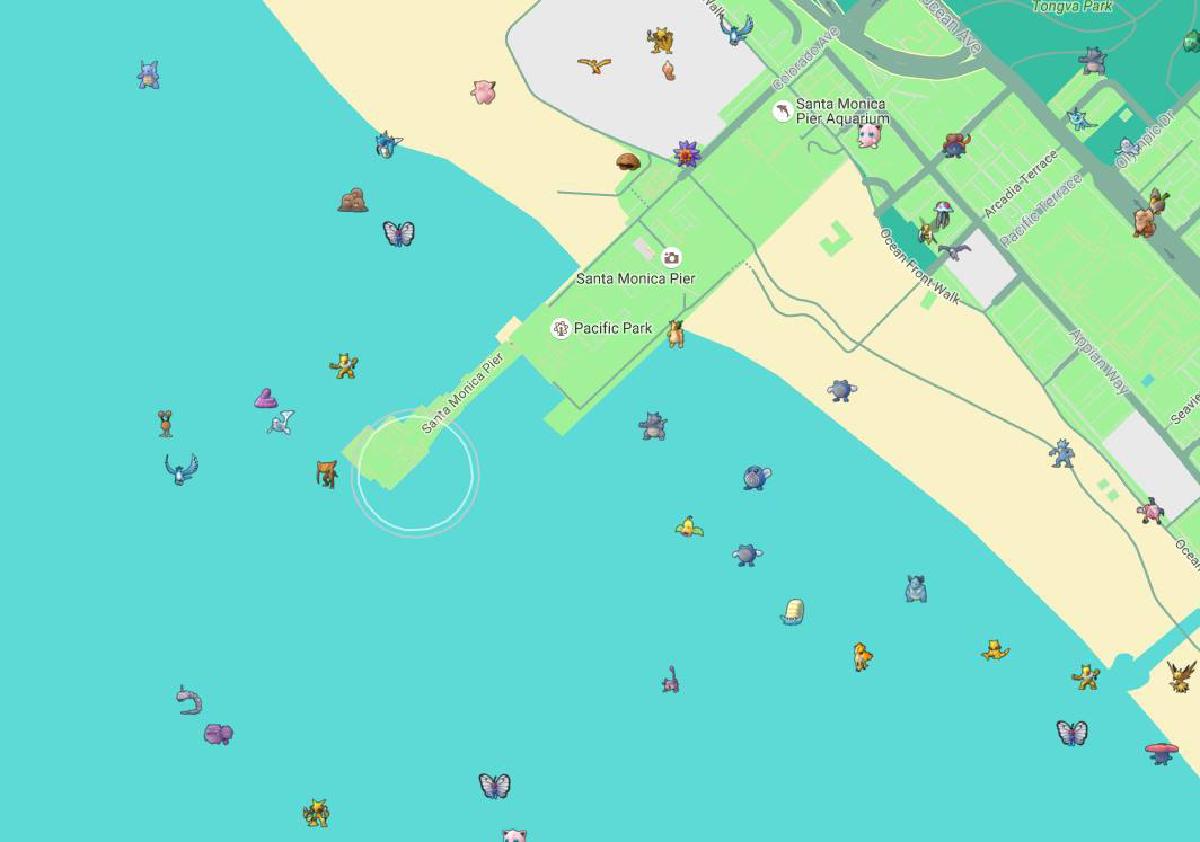
This shows what the client sees with mock data. You can see the player’s bubble on the Santa Monica pier with randomly placed Pokemon all around.
Conclusion#
As frustrating as it was to be banned while working on this, I thankfully had enough time to learn a lot from the experience. I believe that doing callbacks in this way gave me a further appreciation for async/await once I got the hang of that.
These types of projects are also frustrating because it is hard to show a working example of the process running because game automation is such a moving target. I am grateful that I planned ahead and took screenshots of the output while I was working.
In the end, very glad I took the time to do this. For the skill level that I was at the time, I think it was a great project to attempt.
